


Visual knowledge, assessed interactively
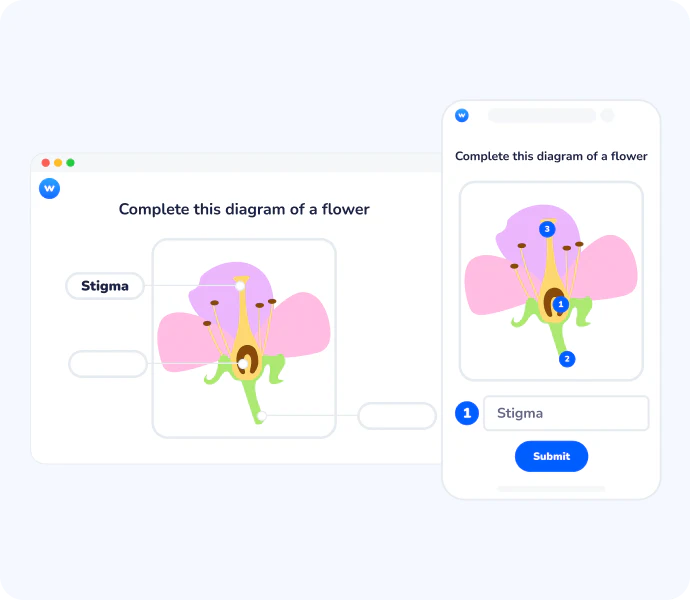
Label an Image turns any diagram, map, or illustration into a hands-on learning activity. Participants identify and name specific parts of an image directly from their device. It's especially effective for subjects where spatial reasoning and precise visual knowledge matter: anatomy, geography, engineering, and more.




Why Label an Image works for visual learning
Active recall over passive observation
Instead of simply looking at a diagram, learners interact with it directly. Naming specific elements forces active retrieval, which strengthens memory and reveals gaps in understanding far more reliably than multiple choice.
Precise, visual assessment
Standard question formats can't evaluate whether a learner truly understands a visual. Label an Image lets you assess exactly that: can they locate, name, and identify specific parts of a structure, system, or space?
Flexible for any subject or image
Upload any visual: anatomical illustrations, world maps, technical schematics, workplace layouts, architecture plans and build an activity around it. The question type adapts to your content, not the other way around.
From passive viewer to active learner
When learners simply look at a labelled diagram, retention is low. When they have to fill in the labels themselves, they engage a different level of thinking. Label an Image creates that shift, participants commit to specific answers, zone by zone, making misconceptions visible in real time for the instructor.

Immediate feedback for the whole group
As soon as responses come in, you can display how each label was answered and reveal the correct answers to the group. This makes Label an Image as useful for formative assessment as it is for review, you can address misunderstandings on the spot, before they solidify.

How Label an Image works
Create your activity
Create a Label an Image question in any Wooclap event and upload any image from your computer: diagrams, maps, schematics, or illustrations. If your image already has labels on it, the Image Labeler agent detects them automatically, places the markers, hides the text, and sets up the full activity in seconds.
Define correct answers
For each label, set the accepted answer and optionally add synonyms or alternative spellings so learners aren't penalised for minor variations. You can also blur specific areas to hide existing captions and guide learner focus.
Launch and assess
Display the question live or assign it for self-paced learning. Participants label the image from their own device and submit their answers. You instantly see who got each label right and can reveal the correct answers to the group.
How teachers and trainers use Label an Image
Label an Image is built for any subject where understanding a visual is as important as knowing the theory. It works equally well in classrooms, training sessions, and self-paced assignments.
Anatomy & health sciences
Students identify organs, bones, or body systems directly on medical illustrations, a more rigorous test of anatomical knowledge than any written question.
Geography & earth sciences
Learners label country names, capitals, landforms, or natural resources on a map, testing spatial and factual knowledge simultaneously.
Engineering & architecture
Instructors use technical diagrams to assess whether learners can correctly name components, materials, or structural elements.
Corporate & safety training
Trainers have employees identify risk zones on a workplace layout or label machine components to validate procedural knowledge before going on-site.
AI that supports effective formative learning
The Image Labeler agent takes this further. Upload any diagram that already has labels, a technical schematic, an anatomy illustration, a map, and the AI automatically places the markers, hides the text, and sets up a ready-to-use recall activity in seconds.
Université d'Ottawa: Engagement and Learning

The auto labeling is a lot easier than having to put the image on and label it and move things around.
Lorie Laroche (Université d'Ottawa)Instructional design & e-learning specialist
Everything you need to turn images into learning activities
Upload any image
Use any JPG, PNG, or GIF file as your base anatomical diagrams, maps, schematics, or custom visuals, with no restrictions on content type.
Place labels anywhere on the image
Click to add numbered markers to specific zones, with full control over placement, so the activity matches exactly what you want learners to identify.
Set correct answers with synonyms
Define one or more accepted answers per label, including alternative spellings or synonyms, so learners aren't penalised for minor variations.
Blur areas to hide existing captions
Mask parts of a pre-labelled image to prevent learners from simply reading the answer, turning a textbook visual into a genuine recall exercise.
Auto-label with AI
Upload an image that already has captions and let the Image Labeler agent detect and generate the labels automatically, including blurred zones, ready to adjust and publish.
Works live and asynchronously
Run the activity during a live session for instant group feedback, or assign it as self-paced work, fully integrated into Wooclap's teaching flow.
Ready to turn your first image into an interactive activity?
Upload a diagram, place your labels, and let your learners show what they know. No setup complexity, just create an event, add a Label an Image question, and go.

Frequently asked questions
Have questions? We’ve got answers to help you get the most our your questions